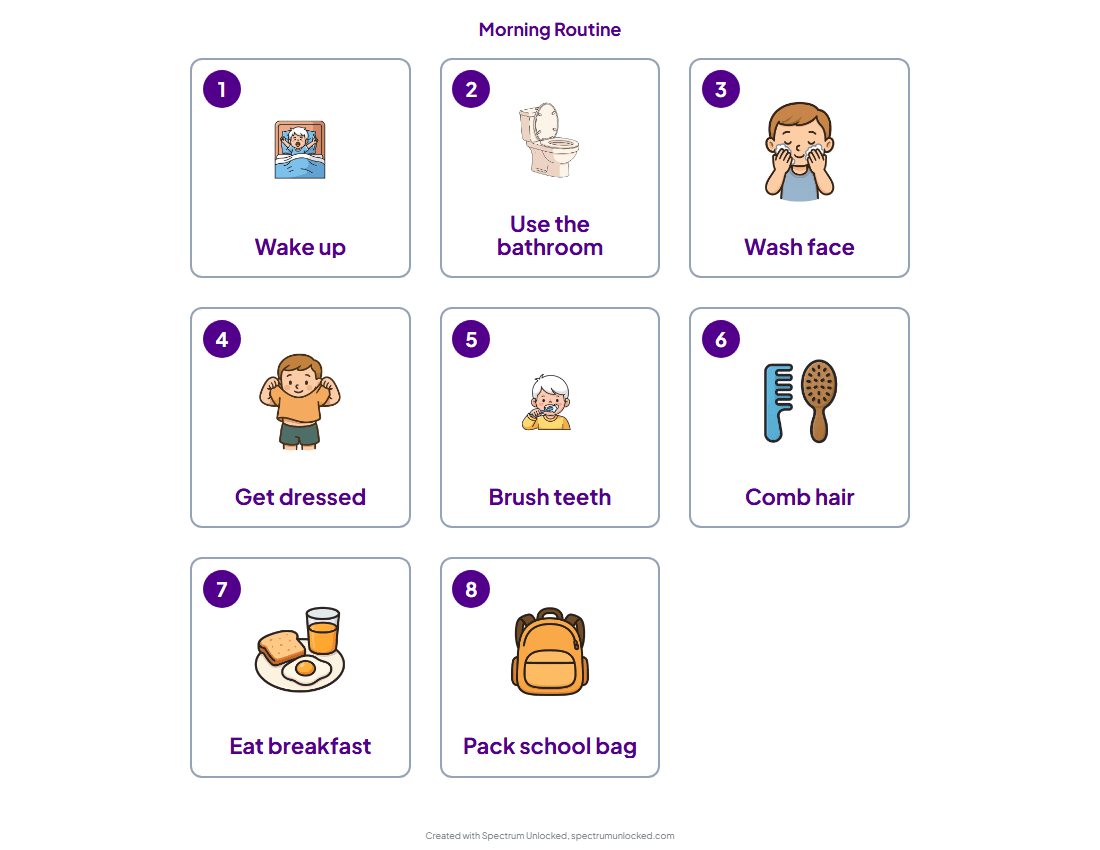
Free Visual Schedule for Autism Mornings
Mornings falling apart? These free printable visual schedules use real picture icons, not text. Includes ARASAAC, Do2Learn, and apps that actually work.
Visual schedules work because they show your child what comes next without relying on words. The key is using actual pictures, not text labels. Below are the best free resources for printable visual schedule icons, templates, and tools that use real illustrations your child can understand. If you want to skip the printable and make your own visual schedule on a phone or tablet, you can build one step by step and adjust it as the morning changes.
Start Here: The Spectrum Unlocked Morning Routine Template
Open the Spectrum Unlocked Morning Routine visual schedule template. It is a ready-made 8-step routine built for autistic mornings, from wake-up through walking out the door, using real picture icons. Customize any step, then print it or save it as a PDF. No email, no fee.
Prefer to assemble your own from scratch? Start with a blank visual schedule: print an empty board in the size and layout you want, then Velcro on your own picture cards. The free icon libraries, templates, and apps below all work too.
Free Visual Schedule Icon Libraries
ARASAAC (Aragonese Center for AAC)
The largest free library of pictographic symbols in the world. Over 40,000 icons designed specifically for communication and visual supports. Search by activity (brushing teeth, getting dressed, eating) and download individual icons or full sets. Available in multiple languages. This is the gold standard for free visual schedule icons.
Do2Learn
Free printable picture cards organized by category: morning routine, hygiene, meals, school, social skills, and more. Cards are simple, clear, and ready to print. Includes schedule templates you can fill with their cards.
Autism Little Learners
Free and low-cost visual supports created by a speech-language pathologist specializing in autism. Includes visual schedule templates, first/then boards, choice boards, and social stories with clear illustrations.
Boardmaker Online (Free Trial)
The most widely used symbol system in schools and therapy clinics. Paid subscription, but offers a free trial. If your child's school uses Boardmaker symbols, using the same icons at home creates consistency.
Free Visual Schedule Templates
Canva
Search "visual schedule" in Canva's template library for free, customizable schedule layouts. Drag in icons from ARASAAC or Canva's own library. Export as PDF and print.
Google Slides / Google Docs
Create a simple visual schedule by inserting images into a table in Google Slides or Docs. Free, easy to edit, and shareable with caregivers and school staff.
Visual Schedule Apps
Choiceworks App (iOS, $7.99)
Highly rated visual schedule app with built-in icons for daily routines, waiting, and feelings. Lets you add custom photos of your child's actual environment.
First Then Visual Schedule (iOS/Android, $4.99)
Simple first/then board app. Great for transitions and children new to visual supports.
The Spectrum Unlocked Visual Schedule Creator
Try the Spectrum Unlocked Visual Schedule Creator
The Spectrum Unlocked Visual Schedule Creator lets you build a daily routine in the browser with drag-and-drop activities and export it as a printable PDF.
Tips for Making Visual Schedules Work
- Use real photos of YOUR child's items when possible, like their actual toothbrush, their actual backpack. Familiar images work better than generic icons.
- Start with just 4-6 steps, not a full day. Expand as your child gets comfortable with the system.
- Put the schedule where the routine happens: bathroom mirror for morning routine, front door for departure routine.
- Let your child move completed items to a "done" column. The physical act builds ownership.
- Pair the picture with the word underneath for children who are beginning to read.
For a deeper guide on making visual schedules work, read our blog post: How to Build a Visual Schedule That Actually Works
Want the powered-up version?
These are great general resources. But Beacon builds a morning routine specifically for YOUR child, using what calms them, what motivates them, and what their mornings actually look like. Save it, adjust it as things change, and share it with caregivers.
Talk to Beacon →