Self-Contained Classroom Setup: A Room-by-Room Guide for Special Education
How to set up a self-contained special education classroom: zones, visual systems, staff routines, and data, with free makers and finished packs for every piece.
Key Takeaways
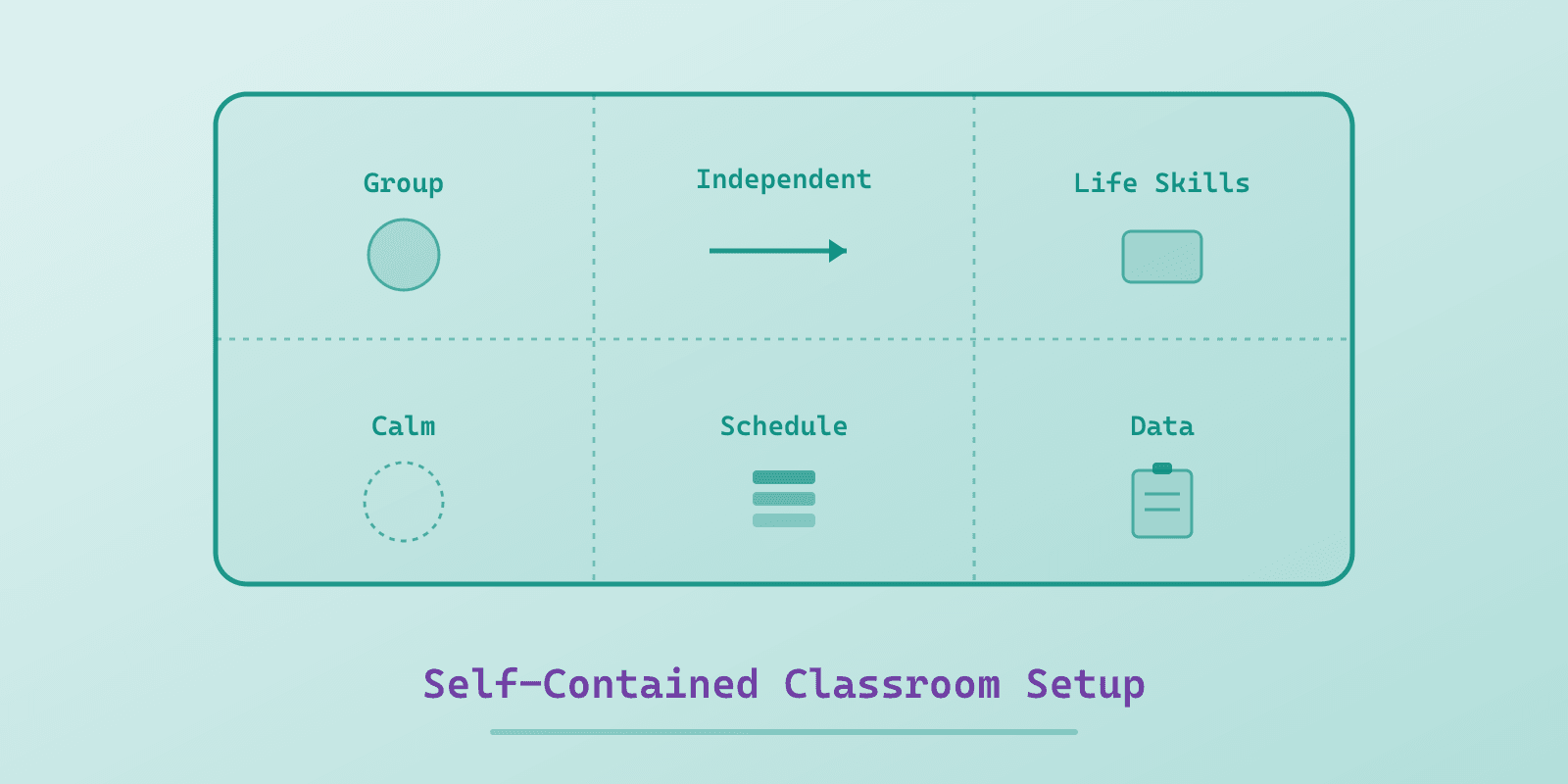
- Set up a self-contained classroom by zone before decor: a group instruction area, an independent work zone, a life-skills station, a calm and regulation space, a schedule wall, and a staff and data corner, each with a defined place even in a small room.
- Build the visual operating system first (schedules, communication boards, token and first-then boards, social stories), because in a self-contained room the visuals are the instruction that keeps running when every adult is busy.
- Write an adult playbook so two to four staff run the room the same way: station expectations in writing, one shared prompting rule, and a weekly five-minute check-in with each paraprofessional.
- Set up one data system in August (one binder or spreadsheet, one sheet format per goal type) so progress reviews in spring are already documented.
- Spend the first two weeks teaching routines, not content. A room that invests two weeks in the schedule and work system earns roughly thirty-four weeks of real teaching.
A self-contained classroom succeeds or struggles on decisions made before the students arrive, and the decisions that matter are not the bulletin boards. They are the systems: where work happens, how transitions run, what every adult says at every station, and where the data lives. Get those four things boring-consistent in August and March runs itself. This is the setup order that works, zone by zone.
Start with zones, not decor
Walk your empty room and assign every square foot a job. A workable self-contained layout has six zones, and smaller rooms can combine them as long as each job still has a place.
1. Group instruction area. Tables or desks facing one direction, teacher materials in reach, and visual supports at student eye level rather than up by the ceiling, because eye level is where the eyes are. This is the zone that needs a plan shaped for a mixed-goal group, where one activity carries a different target for each student; special education lesson plans covers what that page has to hold.
2. Independent work zone. The task-box shelf and individual work spots, arranged left to right: get work from the left, finished bin on the right. That left-to-right flow is the curriculum, the same work system a student will use at a jobsite someday.
3. Life-skills station. A defined counter or table for cooking, hygiene practice, and daily-living work, with materials staged in the same spots every session. If you teach food prep, this zone earns its space several times a week.
4. Calm and regulation space. A corner with a defined boundary (a rug does it), a choice board of regulation options, and a visual timer. It is a teaching space, not a timeout space, and the difference is whether it gets used before escalation instead of after. Print the board with options this room can actually honor, because a board offering a walk when nobody can leave teaches students that the board lies. Ready-made choice boards cover the calm corner, sensory breaks, snack and free time if you would rather start from one and edit it. The blank board is the one to laminate for a zone whose options change week to week, and the done-for-you Choice Board Kit prints all seven boards with their cut-out cards and blanks in one download. A free sample gives you one board to try in the room first.
5. Schedule wall. The room's traffic control. Every student's schedule lives here or travels with them, and either way this is where transitions start. In a secondary or transition room, the Visual Schedule for Adults builds the same schedules from real photos, so older students are not handed cartoon cards. Ready-made adult schedule templates cover hygiene, laundry, chores and cooking.
6. Staff and data corner. Clipboards, data binders, and the paraprofessional station cards. If data lives "somewhere," it lives nowhere.
Build the visual infrastructure first
Before academics or themes, the room needs its visual operating system. In a self-contained setting the visuals are not decoration. They are the instruction that keeps running when every adult in the room is busy with someone else.
Schedules. One format for the whole room, differentiated by level: object or photo schedules for some students, icon strips for others, written checklists for your readers. Build them free with the Visual Schedule Creator, or download the finished Visual Schedule Pack. The setup rule is simple: every student can answer "what's next?" without asking an adult.
Communication. Nonspeaking and emerging communicators need their words available in every zone: a core board at group, PECS cards at snack and choice times. Boards that live in a drawer are not communication supports, so tape them down where the talking happens. Older students in a secondary or transition room get the same support from a communication board for adults, built from real photos instead of cartoon symbols. Ready-made communication board templates for adults cover a hospital stay, a stroke and feelings. The finished PECS and Core Board packs cover it if you would rather not build from scratch.
Behavior systems. Token boards and first-then boards make expectations visible before the moment gets hard. Print one per student who needs one, plus spares, because laminated spares in August prevent 7 a.m. emergencies in October.
Social stories. Pre-teach the year's predictable hard moments (fire drills, the bus, changes in plans) before they happen. Write your own with the Social Story Maker or start from the Social Stories kit. For younger students, the four safety social stories pre-teach staying with an adult, asking for help, body safety, and checking first before going anywhere with anyone. The Transition Social Stories do the same for recess, moving to a new house, and saying goodbye at drop-off, and the Emotions Social Stories for feeling angry, losing a game, asking before taking something, and telling the truth. A kindergarten room can take all of them at once, with the preschool stories for sharing and a quiet voice, as social stories for kindergarteners.
Stock the stations for the year
The difference between a station and a table is materials that regenerate weekly without weekend prep. Stock each zone once.
Independent work. Start the year with task boxes every student can already do. Independence is the skill being taught, so the content should be easy on day one. If the shelf is still empty, free task boxes will fill it faster than a budget request, and most of the good ones get built from what is already in the room. In a K-2 room, free apple sequencing cards make an easy day-one sequencing box, four pictures of an apple picking trip to cut apart and put in order. For teen rooms, skip the preschool matching sets and reach for the Kitchen Safety and Appliance Task Boxes, which run the same sort, match, and sequence operations with age-appropriate content. The free junk drawer sorting sample is another day-one box for a teen room, because sorting everyday things into a labeled tray needs no reading, and the Home Organization Task Boxes it comes from carry the laundry, the lids, the mail and the routines for the same shelf. The free rinse-first recycling sample is a second day-one box, two columns and twelve photographs with nothing to read beyond the two headings, and the Recycling Sorting Task Boxes it comes from are worth the ten minutes of setup they ask for: fill in the Our bins page with the building's own colors before the first run, and the box matches the bins the student will actually use. For the students closest to living on their own, the Basic Home Repair Task Boxes add the jobs that break, tools to jobs, who to call, four simple fixes and a do-it-yourself-or-get-help sort, and the free who-do-you-call sample is a twelve-card box that wants the building's own number written on its rule card before it is laminated, a ten-minute setup worth doing. Once the room can work independently for ten minutes, move the shelf toward vocational task boxes, where each box holds a piece of a real job rather than a school task. The Food Service job skills task boxes take the same format somewhere a student can actually be hired: matching orders to trays, judging whether a station needs restocking, and working to a production goal they count themselves. The free food service sample is one complete box, which is enough to see whether the format fits your students before the shelf is built around it.
Morning work. The first fifteen minutes decides the day, and morning work for special education covers why undated packets outlive dated ones. An undated daily packet at two levels, like the Morning Work for Teens packets, gives every student an independent start while you handle buses, breakfasts, and the one student having a hard morning.
Life-skills station. A semester of no-cook visual recipes needs no appliances at all, and you can add the microwave volume once the safety lesson has been taught. If your room has a burner, 8 stovetop recipes is the next step up and opens with its own stove safety lesson, a fire and burn page and a knives and can lids page, with a free two-recipe stovetop sample to run with one student before you commit the station to it. Round out the station with hygiene routines, community safety for community-based instruction prep, online safety scenario cards for the students who carry a phone into the building (the free cyber safety sample is one unit to run with a student first), making and keeping friends scenario cards for the peer side of the same room, twenty what-would-you-do situations with the answer key kept off the student page (the free friendship sample is the Friendship Check-In and the first four cards), restaurant scenario cards with menu math for the community outing that ends at a table (its free tipping sample is the tipping page and four cards), tipping and splitting the bill for the arithmetic that outing ends on, ten practice bills, six even splits and four pay-your-own scenarios (its free splitting-the-bill sample is the splitting unit on its own), and grocery math for money work. Two more finish the adult strand: rent and bills for the paperwork that arrives after the first paycheck, four mock bills and the scam call (its free paying bills sample is one worked bill and the FTC page), and travel training scenario cards for getting to the outing in the first place, with a free bus scenario sample to run at a table before anyone rides anything. Print one recipe before you commit the shelf to a format: there are free single-recipe samples of the microwave set and the holiday set, and a free community safety sample to run with one student before the first community outing.
Beyond the printable materials, every zone above leans on the same small set of physical supplies: velcro dots to attach visuals, a laminator and pouches to make them survive the year, and a stocked calm-down corner. Spectrum Unlocked's special education classroom must-haves list is the shopping list for exactly that, organized around the same zones this guide sets up. A co-taught or inclusion room stocking both the visual system and the everyday general-ed basics (chart paper, book bins, a wobble stool) can pull from the broader classroom wishlist ideas list too. Once the room is set, the free special education teacher planner is the paper system that runs it: IEP dates, caseload, accommodations, para schedules, and service minutes in one undated packet.
Write the adult playbook
Here is the part most setup guides skip. A self-contained room runs on two to four adults, and inconsistency between adults is the quietest way a classroom falls apart. Same student, same task, one adult who waits and one who rescues: that is not two teaching styles, it is two different lessons.
Three pieces of adult infrastructure, set up once.
Station expectations in writing. What to do, what to say, and what not to do, posted at each station so any adult (including Friday's substitute) runs it the same way. This is the step most rooms skip, and setting up work boxes covers why the system that only exists in your head stops the day you are absent. The Paraprofessional Station Cards give you a ready-made card for each station, and the Special Education Sub Binder covers the morning a guest adult walks in cold.
The prompting agreement. Agree as a team on one rule everyone follows: wait five seconds, then prompt smallest first, moving from a look to a point to a word to a model. Put it on the wall in the staff corner. The prompt an adult does not give is a skill a student keeps.
A weekly five minutes. One short, standing check-in per paraprofessional per week: one win, one confusion, one question. Problems named at five minutes stay small. Working with paraprofessionals goes through the supervisory side of this in more depth, including why closeness is not the same as help. The Paraprofessional Onboarding Kit sets up the role sheets, expectations, and first-week structure so a new staff member is useful by day two instead of week three. The check-in runs better in both directions if the feedback is structured, and the free Paraprofessional Appreciation and Feedback Pack carries a two-way feedback form alongside the thank-you certificates.
Set up data before you need it
Progress reviews arrive whether the data exists or not, so August is when you decide that March's meetings go well: one data system, one binder (or one spreadsheet), one sheet format per goal type, and clipboards that live where the teaching happens. The Data Sheets pack covers ABC, frequency, duration, and IEP progress in print, fillable, and auto-calculating spreadsheet form, so pick the format your team will actually sustain. Sustained mediocre data beats abandoned perfect data every time. Goals still in draft? The free IEP Goal Builder writes the goal and its matching data sheet together.
The first two weeks are the curriculum
Resist academics for a bit. In weeks one and two the schedule is the lesson: practice the routines, run the transitions, teach the work system with easy tasks, and use the regulation space when nobody needs it yet. A room that spends two weeks on routines gets thirty-four weeks of teaching, while a room that skips to content spends the year reteaching September.
A note for the families reading this: the consumables that keep a room like this running, laminating pouches, hook-and-loop dots, sheet protectors, are also the gift teachers say they most want and least often receive. Spectrum Unlocked's teacher gift guide has the survey numbers, and it makes the case for including the paraprofessional too.
One last piece of setup that is not in the room: what you stand in. Everything above assumes you are upright, mobile, and on the floor with students for most of the day, on what is almost certainly a concrete slab. If your feet or back are done by lunch, that is a setup problem too, and Spectrum Unlocked's guide to the best shoes for teachers covers the picks that suit a room where you have to be able to move fast.
Setting up more than one room?
If you are outfitting a program or a building, whether that is several self-contained rooms, a transition class, or a new team, the educator catalog keeps every free maker and finished pack in one place, with licensing for whole-school and multi-classroom use. Email info@spectrumunlocked.com about team licensing and every classroom can run the same system.
Every finished pack on this page has a free sample, so your team can test-drive before you buy.
Planning for a room where every student needs something different?
Beacon remembers your students and your setting, so you are not re-explaining them every time.
What Would Beacon Say?
"Help me plan a week for a mixed-goal group"
Beacon works from the goals and levels already in your room, then gives you something you can run on Monday. Not a blank template to fill in on Sunday night.
Spectrum Unlocked Editorial Team
Editorial Team
The Spectrum Unlocked editorial team combines lived experience as autism parents with research-backed guidance to create resources families can trust.
Frequently Asked Questions
- How do you set up a self-contained special education classroom?
- Set it up by zone before you decorate. Give every part of the room a job: a group instruction area, an independent work zone arranged left to right, a life-skills station, a calm and regulation space, a schedule wall, and a staff and data corner. Then build the visual system (schedules, communication boards, token and first-then boards, social stories), stock each station with materials that regenerate weekly, write down how every adult runs each station, and set up one data system before students arrive. Spend the first two weeks teaching the routines rather than academic content.
- What are the zones in a self-contained classroom?
- A workable self-contained layout has six zones: a group instruction area with visuals at student eye level, an independent work zone arranged left to right so students get work from the left and place finished work on the right, a life-skills station for cooking, hygiene, and daily-living practice, a calm and regulation space with a defined boundary and a choice board, a schedule wall where every transition starts, and a staff and data corner for clipboards and binders. Smaller rooms can combine zones as long as each job still has a defined place.
- How do you set up a classroom for nonspeaking or nonverbal students?
- Make communication available in every zone rather than in one spot. Put a core board at the group table and PECS cards at snack and choice times, and tape the boards down where the talking actually happens instead of leaving them in a drawer. You can build these free with the Core Board Maker and PECS Card Maker, or use the finished Core Board and PECS packs. The setup rule is that a student should be able to request, refuse, and comment from wherever they are in the room.
- How do you keep paraprofessionals consistent in a special education classroom?
- Write the room down. Post station expectations at each station so any adult, including a substitute, runs it the same way. Agree as a team on one prompting rule, for example wait five seconds and then prompt smallest first, and put it on the wall. Hold one short weekly check-in with each paraprofessional to surface one win, one confusion, and one question. Ready-made paraprofessional station cards, a sub binder, and an onboarding kit make this faster to set up.
- What data collection do you need in a special education classroom?
- You need one data system in place before students arrive, not a perfect one. Pick one binder or one spreadsheet, one sheet format per goal type (ABC, frequency, duration, and IEP goal progress), and keep the clipboards where the teaching happens. Sustained, ordinary data beats abandoned, perfect data every time. A data sheets pack that ships in print, fillable PDF, and auto-calculating spreadsheet form lets your team pick the format they will actually keep up.
- What should you teach in the first two weeks of a self-contained classroom?
- Teach the routines, not the curriculum. For the first two weeks the schedule is the lesson: practice transitions, run the work system with easy tasks students can already do, and use the regulation space before anyone needs it. A room that spends two weeks on routines earns roughly thirty-four weeks of real teaching, while a room that jumps straight to content usually spends the year reteaching September.